


Views: 0 Author: Site Editor Publish Time: 2026-09-10 Origin: Site


Achieving a flawless, hand-sanded finish directly off a CNC router requires more than just a high-resolution 3D model. Many operators struggle when finished pieces emerge showing heavy scalloping or visible tool marks. This frustration usually stems from a disconnect between CAM toolpath generation and the mechanical rigidity of the hardware. Fixing this problem matters because excessive manual sanding destroys delicate details and drastically reduces production efficiency. If you want pristine results right off the machine, you need a precise strategy. In this article, you will learn how to optimize stepover math and toolpath algorithms for maximum efficiency. We will also explore the critical relationship between chosen CAM strategies and physical hardware capabilities. By understanding these variables, you can minimize post-processing, increase throughput, and confidently tackle complex topographical carvings.
Two-Stage Strategy: True 3D reliefs require a heavy material removal toolpath (Z-level roughing) followed by a high-resolution 3D finishing pass (Raster or Offset) using a ball-nose end mill.
The Time-Quality Tradeoff: Reducing the stepover percentage exponentially increases machine time; the industry standard for smooth finishes without diminishing returns is typically between 8% and 12% of the bit diameter.
Hardware Dependency: Advanced finishing toolpaths are useless if the machine lacks the structural rigidity to prevent chatter; a dedicated relief carving machine is necessary for continuous micro-movements.
Material Variables: Toolpath strategies must aggressively adapt when shifting from wood to harder substrates, necessitating specialized hardware like a CNC jade carving machine or stone engraving machine to handle high-friction plunging and constant cooling.
A successful relief carving starts long before the finishing bit touches any material. You must clear bulk stock strategically to protect delicate tools later in the process. We use a defined sequence of operations to achieve this.
This critical first step removes the majority of waste material. It uses a flat end-mill to clear bulk material in stepped layers. Think of it like carving a terraced hillside out of a solid block. You leave a small allowance of stock covering the final 3D model.
Implementation Reality: Beginners often skip or under-rough their models to save time. This mistake forces the fragile finishing bit to plunge deeply into solid stock. Such errors cause severe bit deflection, chatter marks, or catastrophic tool breakage. Always rough out your models aggressively but safely.
During raster finishing, the spindle moves back and forth. It cuts in parallel lines across either the X or Y axis. The machine drops the Z-axis up and down to follow the underlying geometry.
Best for: Raster strategies give you consistent, predictable machine time. They work exceptionally well for rectangular models and broad, sweeping landscapes.
Drawback: Raster paths can leave visible directional lines. Complex organic curves often show faint parallel ridges running opposite to the cutting direction.
Unlike raster cuts, the offset toolpath follows the exact contours of your 3D model. It works seamlessly from the center radiating out, or from the outside spiraling in.
Best for: Circular models and highly organic shapes shine here. Medallions, animal figures, and human faces benefit greatly. It minimizes sharp directional changes and maintains a constant, even load on the bit.
Advanced CAM platforms allow you to merge different toolpath strategies. Software platforms like Carveco or VCarve excel at this specific task. You can combine relief and raster paths to optimize processing time. We recommend restricting high-detail offset passes strictly to areas holding complex topology. You can then use faster raster paths for flat background spaces.
Finding the perfect sweet spot between a glass-like finish and acceptable cycle times requires careful math. It also requires practical testing on your specific machine.
Stepover dictates the exact distance between parallel toolpath passes. A 5% stepover creates a nearly flawless, glass-smooth finish. However, it drastically inflates cycle times, sometimes turning a two-hour job into a ten-hour ordeal.
Evaluation Metric: Test a 10% stepover using a tapered ball-nose bit. Use this specific setup as your baseline. Assess the remaining micro-scallops on the surface. Can you remove them faster manually? Manual flap-sanding or abrasive wheels might take just 10 minutes. Adding 4 extra hours to your CNC cycle makes no financial sense.
Table: Stepover Impact on Finish Quality and Cycle Time
| Stepover % (1/8" Bit) | Surface Quality | Estimated Cycle Time Factor | Post-Processing Required |
|---|---|---|---|
| 5% (0.006") | Glass-smooth, zero scallops | 4x Baseline | None |
| 8% (0.010") | Excellent, microscopic lines | 2.5x Baseline | Light buffing only |
| 12% (0.015") | Good, visible fine ridges | 1x (Baseline) | 5-10 mins hand sanding |
| 20% (0.025") | Rough, pronounced scallops | 0.5x Baseline | Heavy sanding, loss of detail |
3D relief carving demands constant Z-axis movement. Plunge rates determine your vertical Z-axis speed. Feed rates govern your horizontal X and Y-axis speed. If plunge rates run disproportionately slower than feed rates, the machine will stutter. This stuttering causes ugly burn marks and uneven surface textures. You must synchronize these speeds closely for fluid motion.
Smooth finishes rely heavily on your controller firmware. Acceleration and deceleration curves control how motors speed up and slow down. Jerky firmware settings translate directly into faceted cuts. Even flawless toolpaths cannot fix bad controller math. You should tune your motor acceleration to handle rapid micro-movements smoothly.
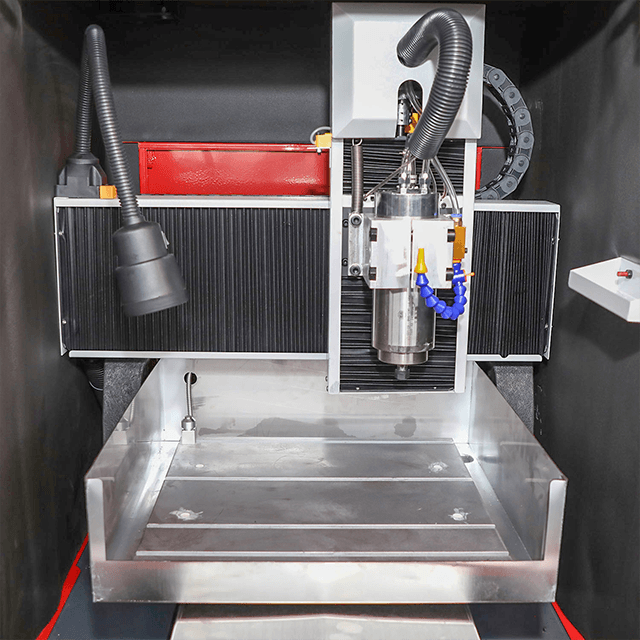
Toolpaths only perform well when your underlying hardware executes them flawlessly. Mechanical limitations will amplify any software inefficiencies during high-resolution carving.
A machine executes hundreds of thousands of rapid Z-axis directional changes during a single relief. Lightweight aluminum extrusions tend to flex under this constant stress. Heavy cast-iron or thick steel frames absorb resonance much better. This physical mass translates directly to smoother toolpath execution and cleaner cuts.
A capable 3-axis engraving machine must process X, Y, and Z movements simultaneously. It must do this seamlessly without pausing. Entry-level controllers often process these movements sequentially instead of simultaneously. This controller limitation leaves distinct facet marks on gently sloped surfaces. You absolutely need a dedicated relief carving machine equipped with a modern DSP or PC-based controller for professional results.
High-resolution finishing requires a precision collet system. You also need a high-quality spindle motor. Even a tiny 0.05mm runout introduces horizontal wobble into the cutting bit. This subtle wobble negates the benefits of a tight 5% stepover. It actively carves microscopic ridges deep into the material surface.
Carving hard materials demands a completely different operational approach. Wood yields easily to cutting edges; stone and jade do not.
Unlike softer woods, stone and jade offer zero physical compliance. Toolpaths must feature significantly shallower depths of cut (DoC). Highly conservative plunge rates are absolutely mandatory. This careful programming prevents your expensive diamond tools from shattering on impact. Spindle speeds must also match the abrasive nature of the material.
Running hard-material toolpaths requires purpose-built equipment. You should use a highly rigid CNC jade carving machine for delicate gemstone and jewelry work. For larger masonry or architectural projects, choose a heavy-duty stone engraving machine. These advanced systems feature fully sealed ball screws. Sealants protect moving parts against highly abrasive stone dust. They also include integrated flood coolant systems to prevent thermal diamond bit degradation.
Toolpaths for stone must never plunge vertically into solid material. You must configure your CAM software properly before exporting G-code. Utilize smooth, angled ramping entries instead of straight plunges. Ramping eases the fragile bit safely into the material while it moves forward laterally.
Before upgrading your shop equipment, you must evaluate the entire hardware and software ecosystem. A weak link anywhere ruins the final product.
Ensure your machine controller fully supports complex G-code formats. Top-tier CAM software generates millions of lines of code for a single relief. Systems running programs like Fusion360, Carveco, or Vectric need ample memory buffers. Buffer overflow errors during long toolpaths will instantly ruin expensive parts.
Verify the controller's actual processing speed. Slow, outdated controllers choke on high-resolution 3D toolpaths. They cannot read code fast enough to maintain fluid motion. They cause the machine to pause momentarily while buffering data. These brief pauses leave ugly burn marks and dwell divots on the relief surface.
Always request a sample cut before purchasing new hardware. Follow this numbered protocol to evaluate machine capability:
Provide a standard, highly detailed 3D STL file to the manufacturer.
Dictate an exact 8% stepover requirement using a standard 1/8" ball-nose bit.
Demand the raw, completely un-sanded result shipped back to your shop.
Inspect the surface using a raking light (a strong light shining horizontally across the surface).
Look for micro-stepping ridges, backlash artifacts, and vertical chatter marks.
This strict testing method reveals the machine's true interpolation capabilities.
Smooth CNC relief carving never happens by accident. It requires optimized Z-level roughing, precision finishing strategies, and excellent mechanical stability. Vibration ruins even the best software code. Whether you process hardwoods or transition to a specialized stone engraving setup, hardware rigidity matters immensely. Prioritize equipment balancing continuous 3-axis motion with robust CAM compatibility. Doing so reduces post-processing bottlenecks and eliminates hours of tedious sanding. Always test your stepover settings to find the best efficiency curve for your specific jobs. Elevating your product quality ultimately starts with smarter toolpath generation and superior machine rigidity.
A: Tapered ball-nose end mills are the industry standard for 3D finishing. The rounded tip creates extremely smooth bottom contours. Meanwhile, the tapered shaft provides the necessary rigidity to prevent deflection during deep relief cuts.
A: Machine time depends heavily on your stepover percentage and finishing bit size. To reduce time without losing detail, isolate highly detailed areas using vector boundaries. Run a fine toolpath only where necessary. Use a larger bit and wider stepover for the background areas.
A: No. Jade and stone require specialized diamond burrs and continuous water cooling. They need significantly slower plunge rates and angled ramped entries. Standard wood toolpaths will instantly destroy the tooling and potentially damage the machine spindle.
A: Yes. The best machine will only follow the G-code it receives. Advanced CAM software generates smoother code by optimizing arcs. It reduces unnecessary Z-retracts and erratic movements, which directly translates to a better physical finish.


