


Views: 0 Author: Site Editor Publish Time: 2026-09-18 Origin: Site


Hardware specifications often dominate the evaluation process. Spindle speed and frame rigidity naturally grab attention during equipment selection. Yet, the CAM software’s toolpath planning dictates the actual profitability and output quality of your setup. Even the most rigid mechanics will underperform if given poor instructions.
Inefficient toolpaths lead to extended cycle times. They cause premature tool wear and leave poor surface finishes behind. These software-induced failures negate the value of even the highest-end equipment. You might buy a premium spindle, but erratic cutting paths will still stall your production schedule.
Optimizing toolpath strategies is a critical decision criteria when investing in a 3-axis engraving machine. It directly impacts material yield, production bottlenecks, and overall equipment effectiveness (OEE). Mastering these digital instructions bridges the gap between raw hardware capability and finished product excellence.
Toolpath geometry (e.g., spiral vs. raster) heavily influences the surface finish and machining time for complex 3D forms.
Advanced feed-rate scheduling prevents tool breakage and spindle overload, particularly when cutting high-value or hard materials.
Evaluating a machine requires assessing its controller’s "look-ahead" capabilities to process dense, complex toolpath code without stuttering.
Matching CAM software capabilities with machine hardware ensures predictable, scalable production.
Toolpath generation is the brain of your manufacturing process. It converts a static 3D model into dynamic motion. Choosing the right algorithm transforms how your facility operates on a daily basis.
Engineers constantly face a core trade-off between speed and resolution. Tighter step-overs increase surface resolution but exponentially increase machining time. If you program a 0.1mm step-over instead of a 0.5mm step-over, your cycle time multiplies rapidly. Buyers must evaluate if their production schedule can tolerate the cycle times required for acceptable finishes. You must balance the physical capabilities of your equipment against customer expectations. Spending ten hours on a perfectly smooth surface makes sense for injection molds. It rarely makes sense for rapid prototyping.
Poorly planned toolpaths spike tool load. Abrupt directional changes force the cutter to absorb immense lateral forces. This accelerates wear and leads to catastrophic tool failure. Dynamic or constant-engagement toolpaths extend consumable life. These modern strategies maintain a consistent chip load by gradually rolling the tool into corners. They prevent sudden spikes in cutting force. You will replace end mills less frequently. Your surface finishes will remain consistent across larger production runs.
Optimized paths reduce severe vibration. They minimize sudden deceleration and acceleration events during complex cuts. This smooth motion protects ball screws and linear guides over the machine's lifespan. Hardware degrades rapidly when forced to constantly jerk and stutter through poorly calculated corners. Smooth, sweeping tool motions keep mechanical components within their optimal stress tolerances. You preserve bearing integrity and maintain factory accuracy for years longer.
| Metric | Standard Toolpath (Legacy) | Optimized Toolpath (Dynamic) |
|---|---|---|
| Tool Engagement | Variable, spikes in corners | Constant, controlled chip load |
| Machine Vibration | High during direction changes | Low, smooth transitions |
| Surface Finish | Inconsistent, potential chatter marks | Uniform, minimal hand-finishing required |
| Hardware Wear | Accelerated bearing and guide wear | Extended mechanical lifespan |
Different shapes require different cutting logic. Applying a generic toolpath to a complex organic surface guarantees sub-optimal results. You must categorize your approach based on the geometry you intend to produce.
Understanding the difference between geometric approaches saves countless hours of programming and machining.
Raster Machining: This method moves the tool back and forth in parallel lines. It is best for flat or slightly curved areas. However, it leaves distinct scallop marks on steep walls. The cutter struggles to maintain consistent engagement on near-vertical drops.
Spiral/Offset Machining: This strategy follows the contour of the part. It maintains consistent tool engagement. This continuous motion is crucial for free-form surfaces. You will frequently require this geometry when operating a relief carving machine. The tool rarely lifts, minimizing non-cutting transit time.
Reverse engineering often starts with scanned data. Directly machining from measured point clouds requires specific software algorithms. Standard CAM struggles with raw point data. Specialized software generates smooth paths without relying on heavily processed solid models. It bypasses the tedious mesh-to-solid conversion phase. You can map toolpaths directly over the triangulated data. This approach preserves intricate scanned textures perfectly.
Material removal rates fluctuate wildly during complex 3D cuts. Dynamic feed-rate adjustment addresses this volatility. The software slows the machine down in tight corners. It speeds up on wide, flat expanses. This prevents chatter and ensures consistent chip loads across varying depths of cut. Spindle load remains steady. You avoid tripping servo alarms or snapping fragile micro-tools during aggressive material entry.
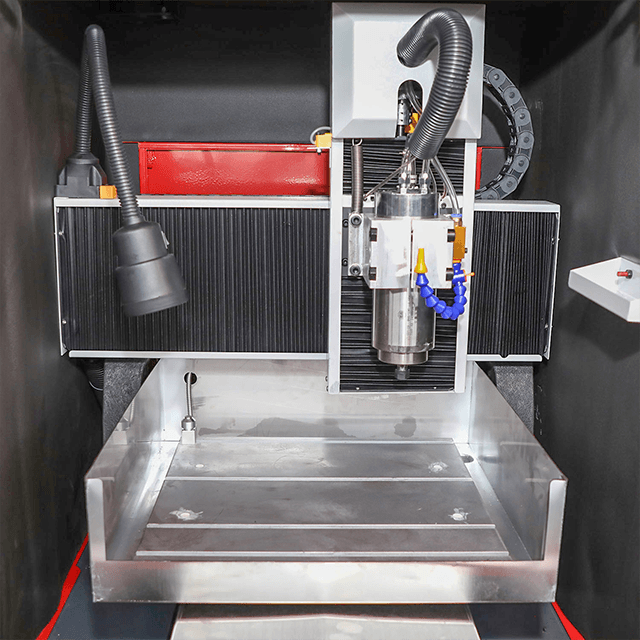
Your CAM software and your machine controller must speak the same dialect flawlessly. A brilliant toolpath fails entirely if the controller cannot interpret it at speed.
A sophisticated 3D engraving machine requires a robust brain. The controller must be capable of reading thousands of lines of G-code ahead of time. Complex organic shapes generate massive files composed of microscopic linear movements. Weak controllers will stutter. They cannot process data fast enough to maintain feed rates. This data starvation causes the tool to dwell in one spot for fractions of a second. These micro-pauses cause burn marks, tool rubbing, and poor finishes. Look-ahead capability ensures fluid, uninterrupted motion across dense digital terrain.
The post-processor translates your CAM strategy into machine-specific G-code. Assess the availability and maturity of this translator before purchasing software. A poorly written post-processor ignores advanced machine functions. It might fail to output arc interpolation codes (G2/G3), forcing the machine to cut circles as hundreds of jagged little lines. You must verify compatibility between your chosen CAM platform and your specific hardware controller.
Materials do not always behave predictably. When cutting organic materials or composites, density shifts occur rapidly. Knots in wood or resin pockets in composites demand immediate adaptation. The software must allow operators to easily adjust toolpath parameters. You need the flexibility to account for localized material inconsistencies. Rigid, locked-down code forces operators to babysit the machine. Flexible control systems let you override feed rates on the fly to accommodate physical reality.
Ignoring toolpath optimization introduces severe operational risks. Bad code does more than just slow you down. It actively destroys hardware, materials, and profit margins.
Software failing to calculate tool-holder collision leads to immediate disaster. The spindle collet might ram into a steep cavity wall. Over-machining tight corners also leads to scrapped parts. If the algorithm ignores the physical diameter of the tool, it will cut too deeply into interior radii. You end up with dimensionally inaccurate products. Scrap rates climb, and operators lose trust in the automated process.
Material costs often eclipse machine time. In precision applications, such as utilizing a CNC jade carving machine, mistakes are brutally expensive. A single erratic Z-axis plunge due to faulty path generation ruins expensive raw materials instantly. Jade, rare hardwoods, and aerospace alloys do not offer second chances. Reliable, gouge-free toolpath generation is mandatory when the raw billet costs thousands of dollars.
Not all wasted time happens while cutting. Poorly optimized rapid movements (G0) between cuts waste significant production hours over a yearly cycle. The machine retracts to a safe height, moves across the table, and plunges back down. If the CAM software fails to minimize these non-cutting transit paths, your machine spends hours cutting air. Eliminating unnecessary retracts drastically improves throughput without increasing the actual cutting feed rate.
Excessive Retract Heights: Setting the safe Z-height too high adds seconds to every single rapid move.
Ignoring Climb vs. Conventional Milling: Selecting the wrong cutting direction causes tool deflection and poor wall finishes.
Forcing Large Tools into Small Radii: Failing to use rest-machining strategies leaves uncut material and breaks tools.
You cannot evaluate a machine in isolation from its software ecosystem. Your purchasing strategy must integrate both halves of the manufacturing equation.
Your daily production reality dictates your software needs. High-volume 2.5D cutting requires different pathing strengths than highly detailed, single-run 3D reliefs. Nesting multiple flat parts prioritizes automatic feature recognition and material yield optimization. Conversely, carving continuous 3D landscapes demands robust surface-following algorithms. Define your primary geometry first. Then hunt for the software and hardware combination built for that exact geometry.
Compare the risks of locked-in proprietary CAM ecosystems against open-architecture controllers. Proprietary bundles often offer seamless, plug-and-play experiences. The software knows the machine perfectly. However, they limit your future flexibility. Open-architecture controllers accept industry-standard CAM software outputs. They allow you to upgrade your software later without replacing the physical machine. You must decide if immediate convenience outweighs long-term flexibility.
Toolpath optimization is a learned skill. It requires mentorship and practice. Evaluate vendors based on their willingness to provide application engineering support. Do they offer training on specific CAM strategies during the onboarding phase? A vendor who drops off a machine and leaves provides little value. Seek partners who review your actual CAD models and teach your operators how to program them efficiently. Strong support turns average operators into expert programmers.
A 3-axis machine is only as capable as the instructions it is fed. Advanced mechanics remain dormant without intelligent digital commands. Toolpath planning bridges the gap between digital design and physical reality. It dictates how smoothly the axes move, how long the tools last, and how flawless the final surface appears.
Buyers must evaluate machine controllers and CAM software as a unified system. Treating software as an afterthought leads to immediate bottlenecks. You cannot fix bad code with a stiffer gantry. The intelligence must exist before the spindle ever turns on.
Your next step is simple. Do not buy based on a specification sheet alone. Request a "cut time" and "surface finish" benchmark test from machine vendors. Provide them with a standardized 3D model. Ask them to document their specific toolpath strategy. Compare the physical results and the required cycle times to make an informed, data-driven decision.
A: To a limited extent. Techniques like trochoidal milling reduce lateral forces, but software cannot entirely fix mechanical deflection or backlash in poorly built hardware. Optimized paths reduce vibration, but a weak frame will still struggle to hold tight tolerances during aggressive material removal.
A: Yes. Art-focused CAM software often includes proprietary toolpath algorithms optimized for organic shapes and high-resolution reliefs, differing from standard mechanical CAD/CAM platforms. They excel at manipulating imported meshes and projecting fluid toolpaths over complex textures.
A: While it may slow the machine during heavy cuts to protect the tool, it accelerates non-critical paths. It speeds through shallow regions and transitions. This intelligent pacing often results in a net reduction of cycle time and significantly fewer broken tools.


